 Claude
 ChatGPT
 Le Chat · Mistral AI
 Gemini CLI
 Cursor
 GitHub Copilot · VS Code
Your company’s API
The one your service provider or accounting software vendor uses. It reaches your trips, schedule, drivers, vehicles, contacts and commercial documents, within exactly the limits of what you have ticked.

Logipax · API and MCP
Software that talks to nothing condemns you to retyping. Your accountant wants your invoices, your ordering customer wants to send orders from their own system, and you might like to put a question to an assistant without opening a dozen screens. Logipax opens three doors for that, and you decide what each one lets through.
14 days free · No payment card · No setup fee
MCP · Your assistant, your data
The MCP server connects your assistant to your Logipax data. Ask in the tool you already use: it retrieves the information you have allowed it to access.
Connect my assistant« Which customers have invoices more than 60 days overdue? »
Retrieve the billing information you have authorized, then ask your assistant to draft payment reminders.
You choose what your assistant can access.For your technical teams
Adding an MCP connection depends on your AI application's plan and permissions. Each logo links to its documentation.
They do not serve the same person and do not give the same rights. That is deliberate: opening a door too wide is the easiest way to lose control of your data.
The one your service provider or accounting software vendor uses. It reaches your trips, schedule, drivers, vehicles, contacts and commercial documents, within exactly the limits of what you have ticked.
The one an ordering customer connects to their own system to send their orders and retrieve their documents. It has the same rights as their customer portal: no more, no less. So they only ever see what concerns them.
The one that connects Logipax to the artificial intelligence you already use, Claude, ChatGPT or another. You put your questions in your usual tool, and it fetches the answer from Logipax.
Your day, made simpler
You may have got into the habit of working with Claude, ChatGPT or another assistant. Logipax connects to it: you authorize it once, choosing what it may look at, and after that you talk to it as usual. It does not guess and it does not make you retype anything: it reads your real data at the moment you ask the question. That is where it becomes useful, because it can carry on with the rest of your office: pull your unpaid invoices out of Logipax, then write the three reminders for you in your email.
Your day, made simpler
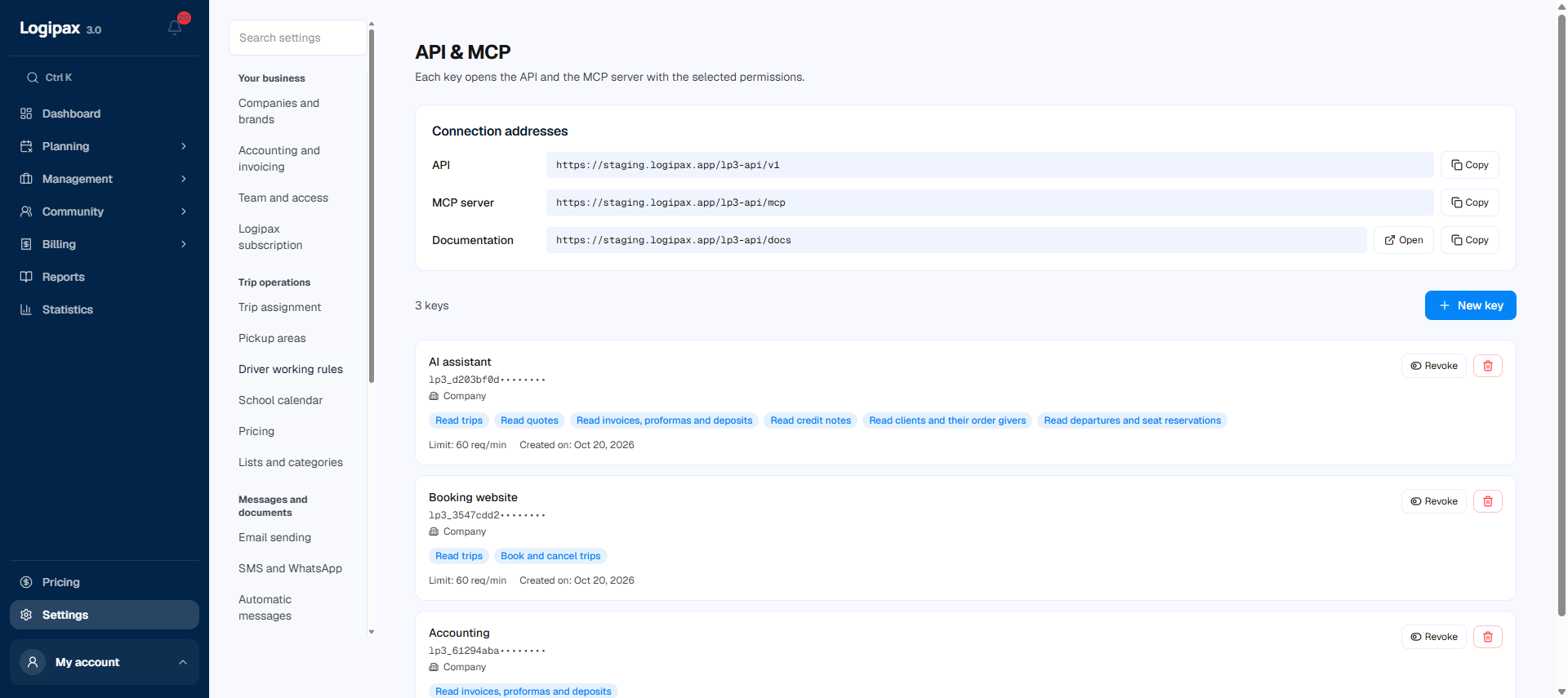
Permissions are not a single switch. Each area is set separately, and within an area, reading, writing and exporting are three distinct rights. Your accounting software only needs invoices read-only: that is all its key will be able to do, even if someone makes a mistake writing its request. Each key also carries its own limit on calls per minute, and can be revoked in one click without touching the others.
Your firm collects the month’s invoices and payments without you exporting anything by hand, and without access to your operations.
Their system places requests in yours, with the information it already has. They arrive pending approval, as they do from the customer portal.
If you follow your business in an analytics tool or a shared spreadsheet, the figures flow into it instead of being copied across.
Drivers’ duty hours can be read through the API, with a dedicated right, separate from the rest of their record.
A key can do only what you have ticked, and full access is flagged as such when you grant it. Every call is logged: you know which key did what, and when. A key is revoked immediately, without waiting for the provider to update their side. And none of this changes where your data lives: it stays in your own database.
Integrations
From transport schedules to payments, Logipax brings useful information together for your team.

Flight updates help identify delays and cancellations affecting transfers.

 via Amtraker
Amtraker data for Amtrak and VIA Rail train tracking.
Online payments connected to trip records.
Payments between participants through Stripe Connect.
Addresses and routes accessible from each trip.
Email conversations alongside requests and trips.
Microsoft 365 email conversations alongside requests.
Email sending through your SMTP configuration.
An assistant that reads requests and prepares a summary for your approval.
Claude models accessed through Amazon Bedrock.

Primary hosting in Paris, with backup copies in Ireland.
SMS and WhatsApp messaging for trip communications.
Flight and train tracking is included with Business, Enterprise, Corporate and Scale.
For trips in the Netherlands or Norway, the directory also covers rail data from NS and Entur.
A plan for your business
Keys are created from your company settings, by a user with administrator rights. Each key carries its permissions, its limit on calls per minute and its creation date, and can be revoked at any time.
Compare plansThe first works for you and can reach your whole operation, depending on the rights you tick. The second works for an ordering customer and is limited to what their customer portal already shows them: their own requests and their own documents. A customer never sees your other customers, or your purchase prices.
Any that can connect to software through this standard, which is the case for Claude and ChatGPT, and several others. You authorize the connection once from your assistant, choosing what it can look at, and after that you talk to it normally: it reads your real data instead of making you copy it across.
The built-in assistant works inside Logipax: it creates your trips, prepares your invoices, and you approve every entry. An AI connected from outside works from your desk: it queries Logipax and then carries on with your other tools, your email or your documents. Both are useful, at different moments of the day.
You revoke it, and it stops working immediately. The other keys carry on running. The log tells you what was done with it before it was revoked, which lets you measure precisely what was exposed.
Yes, and it is set per key. The default setting is 60 calls per minute, which is more than enough for an accounting feed or a dashboard. Tell us if your use goes beyond that.
Write to us and tell us which tool you are connecting and who is handling it. We pass what is needed to the person concerned and answer their technical questions directly.
Your next day starts here
Try it with your own trips, or discover Logipax with our team.
14 days free · No payment card · No setup fee


